- Published on
Unity Tricks: How To Reduce Your Game Build Size
- Authors

- Name
- Nassef Bouanane
- @NassefBouanane
Reducing Build Sizes in Unity: Tips and Techniques
Unity is undoubtedly one of the most popular game engines, renowned for its versatility and ability to facilitate the creation of high-quality games. However, one common issue developers face is large build sizes. These can consume considerable disk space and pose challenges in distribution, especially for platforms with size limitations. Fortunately, there are tricks and techniques to effectively reduce build size.
Accessing the Editor Log
The first step in addressing large build sizes is accessing the Editor log generated during the build process. This log provides valuable information about elements contributing to the build's size.
Steps to Access the Editor Log:
- Build Your Project: Start by building your Unity project for the desired platform.
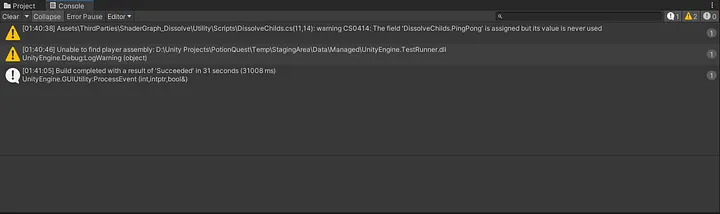
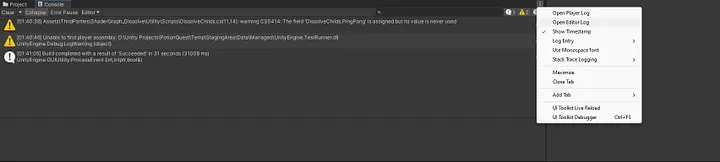
- Open the Editor Log: Once the build process is complete, navigate to the Unity Editor’s Console window.
- Locate the Build Report: Scroll down to the section labeled "Build Report". This section details the size of various assets and dependencies.
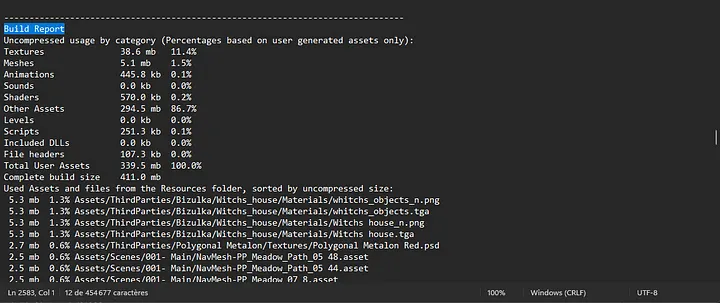
By analyzing the Build Report, you can identify which assets are consuming the most space, providing a starting point for optimization.
Asset Optimization
Once you’ve pinpointed the assets significantly impacting your build size, employ the following strategies to optimize them:
1. Texture Compression
- Use Unity’s built-in texture compression settings to reduce the size of textures without sacrificing quality.
- Experiment with different compression formats and settings to balance size and visual fidelity.
2. Mesh Optimization
- Reduce the polygon count of 3D models, merge meshes, and remove unnecessary geometry.
- Utilize tools like Unity’s ProBuilder or third-party plugins for efficient optimization.
3. Audio Compression
- Compress audio files to minimize size without compromising quality.
- Unity supports various audio compression formats, allowing you to choose the most suitable option for your project.
4. Asset Bundling
- Organize and package assets more efficiently using Asset Bundling.
- Bundling reduces redundancy and eliminates unnecessary data, significantly shrinking build size.
5. Code Stripping
- Use Unity’s code stripping tools to remove unused code and dependencies from your project.
- This not only reduces build size but also enhances runtime performance.
Iterative Testing and Optimization
Optimizing your build size is an iterative process requiring testing and refinement. After implementing optimization techniques:
- Test Your Build: Ensure the changes haven’t negatively impacted gameplay or performance.
- Iterate as Needed: Adjust optimizations to balance build size and game quality.
By systematically analyzing and optimizing assets and leveraging Unity’s built-in tools, you can significantly reduce your game builds' size without compromising the player experience.